What Is a SharePoint Migration?
A SharePoint migration is the process of moving content, workflows, permissions, and customisations from an on-premises SharePoint environment (SharePoint 2013, 2016, or 2019) to SharePoint Online, which is part of Microsoft 365.
It is more than a file copy. A typical migration involves:
- Content: Documents, lists, libraries, and site collections
- Permissions: User and group access levels, inheritance settings, and external sharing configurations
- Workflows: SharePoint Designer workflows, InfoPath forms, and third-party automation
- Customisations: Branding, web parts, and custom code that may not translate directly to the cloud
- Metadata: Document properties, content types, and taxonomy structures
- Integrations: Connections to line-of-business systems, ERP, or CRM platforms
SharePoint Online runs on a modern architecture with continuous updates, AI-powered search, and native integration with Teams, OneDrive, and Copilot. The migration is not just about moving files. it is about modernising how your organisation works with information.
Why You Need to Migrate Now
SharePoint 2013 reached end of life in April 2023. SharePoint 2016 extended support ends in October 2026. After that date, Microsoft stops releasing security patches. Running an unpatched SharePoint environment creates serious risks:
| Risk | Impact |
|---|---|
| No security patches | Vulnerabilities remain unaddressed; exploit risk increases over time |
| Compliance failures | Auditors and regulators expect current, supported software |
| No Microsoft support | Break-fix incidents require third-party consultants at premium rates |
| Compatibility gaps | New browsers, Office versions, and devices may not work correctly |
| Missed capabilities | SharePoint Online receives features monthly; on-prem gets nothing |
As well as reducing risk, migration delivers measurable benefits:
- Lower infrastructure costs: No more servers, SQL licences, or storage hardware to maintain. Evocate offers managed services that cover ongoing administration
- Automatic updates: Security patches and feature releases happen without your involvement
- Remote access: Staff can work from anywhere without VPN complexity
- AI readiness: SharePoint Online is the foundation for Microsoft Copilot and AI-powered search
- Better collaboration: Native Teams integration, real-time co-authoring, and modern commenting
How SharePoint Online Helps Your Organisation
Migration is not just about replacing old technology. It is about enabling new ways of working.
For IT Teams
- Reduced server maintenance and patch management
- Centralised admin centre for governance and reporting
- Built-in data loss prevention and retention policies
- Simplified backup and disaster recovery through Microsoft’s infrastructure
For End Users
- Modern, responsive interface that works on mobile devices
- Real-time document co-authoring in Word, Excel, and PowerPoint
- Intelligent search that surfaces relevant content across the organisation
- Seamless integration with Microsoft Teams for chat, meetings, and file collaboration
For Compliance and Security
- Sensitivity labels and encryption built into the platform
- Audit logs and eDiscovery tools for legal and regulatory requirements
- Conditional access policies that enforce MFA and device compliance
- Information governance that automatically applies retention and deletion rules
How to Approach a Migration Yourself
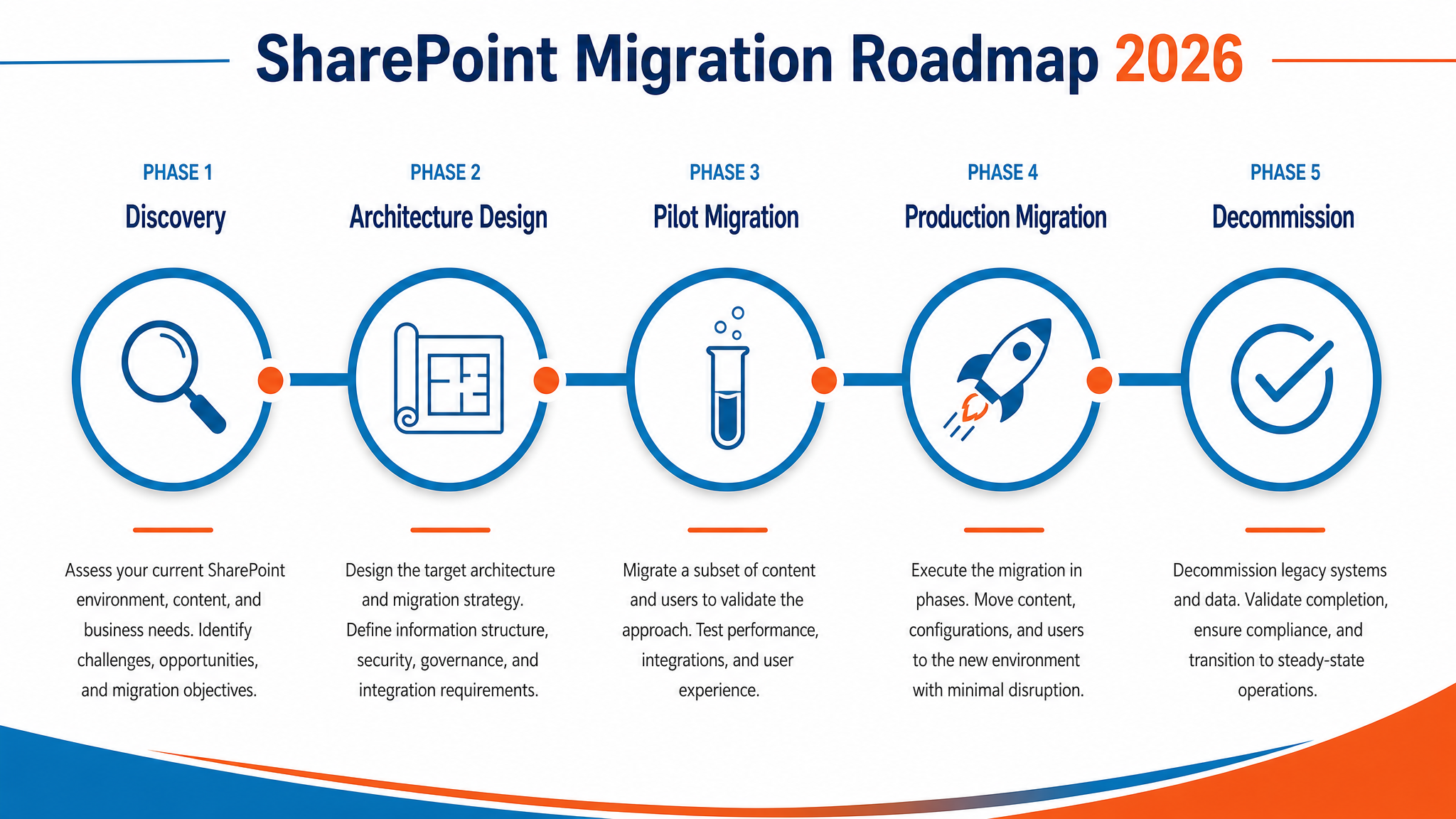
If your environment is small and relatively standard, you can manage a migration yourself. This is the roadmap we use.
Phase 1: Discovery and Inventory (2 to 4 weeks)
- Catalogue your farm: Document all web applications, site collections, subsites, and libraries
- Analyse customisations: Identify InfoPath forms, SharePoint Designer workflows, custom web parts, and third-party solutions
- Map permissions: Document who has access to what, including external users and broken inheritance
- Assess content volume: Measure total data size, large files, and version history depth
- Identify owners: Find business stakeholders for each site collection who can validate requirements
Phase 2: Target Architecture Design (2 to 3 weeks)
- Plan your information architecture: Hub sites, site collections, and flat structure versus deep hierarchy
- Design governance: Site creation policies, naming conventions, retention labels, and external sharing rules
- Map permissions to modern groups: Replace legacy SharePoint groups with Microsoft 365 Groups or Azure AD security groups where appropriate
- Plan for customisations: Decide which workflows to rebuild in Power Automate, which forms to replace with Power Apps, and which customisations to retire
Phase 3: Pilot Migration (2 to 3 weeks)
- Select a representative pilot: Choose a site collection that uses common customisations and has an engaged owner
- Use the SharePoint Migration Tool (SPMT): Microsoft’s free tool handles file and list migration with metadata preservation
- Validate permissions: Confirm users can access content with correct rights
- Test workflows: Rebuild critical workflows in Power Automate and verify they function
- Gather feedback: Interview pilot users and refine the approach before scaling
Phase 4: Production Migration (4 to 12 weeks)
- Batch sites by priority: Migrate low-risk sites first, business-critical sites last
- Communicate early and often: Tell users what is changing, when, and how to get help
- Run parallel during transition: Keep on-premises accessible until users confirm the cloud version works
- Monitor and fix: Address permission issues, broken links, and missing content immediately
Phase 5: Decommission and Optimise (2 to 4 weeks)
- Retire the old farm: Once all content is verified and users are comfortable, shut down on-premises servers
- Enable new features: Turn on version history, co-authoring, and sensitivity labels
- Train users: Run sessions on modern SharePoint features, Teams integration, and search
- Measure adoption: Track active users, file activity, and search queries to confirm value
When to Bring in a Specialist
Self-managed migrations work for simple environments. Most organisations underestimate the complexity. These are the signs you need help:
- Custom development: Custom web parts, event receivers, or farm solutions that need rebuilding
- Complex workflows: Multi-stage approval processes with conditional logic and external system integration
- Large data volumes: Over 500 GB of content, or sites with millions of documents
- InfoPath dependencies: Hundreds of forms that need redesigning in Power Apps or alternative platforms
- Tight deadlines: A compliance or audit deadline that leaves no room for iteration
- Limited internal capacity: Your IT team is already stretched and cannot dedicate resources for months
Evocate has delivered countless SharePoint migrations since 2009. This is how we approach it:
- Fixed-price assessment: We audit your farm, identify risks, and deliver a migration plan with clear costs and timelines
- Phased delivery: We migrate in waves, starting with low-risk sites and building confidence
- Custom workflow rebuilds: We recreate complex workflows in Power Automate, often improving them in the process
- Governance setup: We configure retention, sensitivity labels, and site lifecycle policies before go-live
- Training and handover: We train your team and document the new environment so you can operate independently
Real-World Examples
Some of the SharePoint migrations Evocate has delivered:
- Penske: 12 TB SharePoint migration across Australia, New Zealand, and India. 19 branch offices, thousands of users, complex permission structures. Delivered on time with zero data loss.
- EPA Victoria: Consolidated a fragmented SharePoint environment spanning multiple business units into a single governed platform with retention policies and sensitivity labels.
- Sydney Catholic Schools: Built a Child Safe Communications Portal on SharePoint. Required strict access controls and compliance with child safety legislation.
- Perilya: Consolidated fragmented file servers and Microsoft 365 environments for the mining company, replacing legacy on-premises infrastructure.
- Linfox: Evocate’s founding client since 2009. Multiple SharePoint engagements across 17 years, including intranet, document management, and governance.
Call 1300 386 228 or request a SharePoint migration assessment to discuss your environment.
Related Reading
- Microsoft Copilot Readiness: Is Your Tenant Actually Ready?: Migrating to SharePoint Online is the first step. Before enabling Copilot, your tenant needs a governance review.
- Google Workspace to Microsoft 365 Migration: A Step-by-Step Guide: If your organisation is moving from Google rather than on-premises SharePoint, this guide covers the full platform switch.
SharePoint Designer workflows do not migrate directly. We rebuild them in Power Automate, which offers more capabilities and better integration with Teams and Outlook. Third-party workflow tools like Nintex may have migration utilities.
InfoPath is retired. Forms must be rebuilt in Power Apps, Microsoft Forms, or a third-party platform. Evocate assesses form complexity and recommends the most cost-effective replacement approach.
A small environment (under 100 GB, minimal customisations) takes 8 to 12 weeks. A large enterprise farm with complex workflows and custom code can take 6 to 12 months. The assessment phase defines the timeline accurately.
SharePoint Online uses different URL structures. We implement redirects where needed and update internal links. External bookmarks break unless redirected. We plan for this during architecture design.
Yes. A common approach is to migrate content to SharePoint Online while keeping the on-premises farm read-only for reference. Users switch gradually, and the old farm is retired once confidence is high.