
Policy Management: One Place for All Organisational Policies
Every organisation has policies scattered across shared drives, old intranets, email attachments, and filing cabinets that nobody opens. When staff cannot find the current version of a policy, they either make assumptions or ask someone who may not know the latest either. When auditors ask for evidence of policy communication and acknowledgment, the compliance team scrambles.
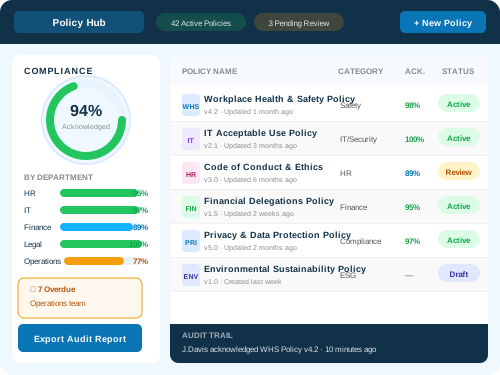
Evocate's Policy Management product solves this by giving your organisation a single, governed SharePoint hub where all policies and procedures live, with version control, access restrictions, review workflows, and acknowledgment tracking built in.
Staff find the policy they need through search or category navigation. Policy owners manage review cycles and approvals through automated workflows. Compliance teams track who has acknowledged what and when, with reports ready for auditors at any time. Call 1300 386 228 to see a demo.
Transform How Your Organisation Works with Policy Management
SharePoint Policy Hub that makes finding up to date policies and procedures easy. Quickly manage access and track acknowledgments.
Ensure consistent policy application and maintain compliance with our comprehensive policy management system. Easily store, organize, and disseminate policies, track employee acknowledgments, and simplify audits.
- Built on Microsoft 365
- Rapid deployment with a dedicated Evocate team
- Ongoing managed support across all 5 Australian offices
Microsoft 365 · Australian-owned · Your tenant
Popular Features
Everything you need to transform how your organisation works
Central location for all policies and procedures
One searchable repository where staff find the current version of every policy without guessing which folder or site to check.
Workflow driven review and approval
Configurable approval workflows that route policies to the right reviewers and track sign off with full audit trails.
Access controls for sensitive documents
Role based permissions ensure policy documents are only visible to the people who need them, with access logging.
Policy Management Features
Central Policy Library
Library features:
- Category Navigation: Policies organised by type, department, and compliance domain with faceted filtering.
- Search: Full text search across all policy documents with relevance ranking and metadata filtering.
- Version History: Complete version trail showing every change, who made it, and when, with ability to compare versions.
- Access Controls: Restrict sensitive policies to specific teams, roles, or clearance levels using SharePoint permissions.
Review and Approval Workflows
Workflow features:
- Scheduled Reviews: Automatic notifications when policies are due for review based on configurable cycles.
- Multi Stage Approval: Sequential or parallel routing to subject matter experts, legal, and executive approvers.
- Delegation: Automatic reassignment when approvers are unavailable with escalation after defined timeframes.
- Audit Trail: Complete record of every review decision, comment, and approval action for compliance evidence.
Acknowledgment Tracking
Acknowledgment features:
- Targeted Distribution: Send acknowledgment requests to specific groups based on policy applicability.
- Automated Reminders: Escalating reminders for staff who have not acknowledged within defined timeframes.
- Compliance Reporting: Real time dashboards showing acknowledgment rates by policy, department, and individual.
- Re Acknowledgment: Automatic re acknowledgment requests when policies are materially updated.
Compliance Reporting and Audit Support
Reporting capabilities:
- Policy Register: Complete inventory of all policies with ownership, review dates, and status.
- Overdue Reviews: Dashboard highlighting policies past their review date with escalation visibility.
- Acknowledgment Evidence: Exportable reports showing who acknowledged what and when for auditor submissions.
- Governance Metrics: Trend reporting on policy health, review timeliness, and organisational compliance.
What Is Policy Management and Why Does It Matter?
Policy Management is a SharePoint based application built by Evocate that provides a governed central location for organisational policies and procedures with version control, review workflows, access restrictions, acknowledgment tracking, and compliance reporting on your existing Microsoft 365 subscription.
Single source of truth
Every policy lives in one governed location. Staff always find the current version without guessing whether what they found is outdated.
Automated review cycles
Review reminders, approval workflows, and publishing happen automatically so policies never silently expire or go unreviewed.
Acknowledgment evidence
Track who has read and accepted each policy with timestamps, reminders, and exportable compliance reports.
No additional licensing
Policy Management runs on your existing Microsoft 365 and SharePoint subscription with no per user add on fees.
Policy Management Capabilities
Practical delivery areas with architecture, governance, and adoption detail for production environments.
Policy Library Design and Configuration
Evocate designs your policy library structure, categories, metadata, and navigation to match your governance framework and make policies discoverable by staff without training.
- Policy category taxonomy design
- Metadata schema for classification and filtering
- Navigation and search configuration
- Permission model for sensitive policies
- Template design for consistent policy formatting
Workflow Configuration
Evocate configures review and approval workflows tailored to your governance requirements including review cycles, approval chains, escalation rules, and publishing controls.
- Review cycle scheduling by policy type
- Multi stage approval routing configuration
- Escalation and delegation rules
- Version management and publishing controls
- Notification templates and reminder schedules
Acknowledgment System Setup
Evocate configures acknowledgment tracking with audience targeting, reminder schedules, and compliance reporting dashboards that give governance teams real time visibility.
- Audience targeting based on policy applicability
- Reminder escalation schedule configuration
- Re acknowledgment triggers for material updates
- Compliance dashboard design and deployment
- Evidence export formatting for auditor requirements
Migration and Content Import
Evocate migrates existing policies from shared drives, legacy systems, and document management platforms into Policy Management with metadata mapping and classification.
- Existing policy audit and inventory
- Document migration with metadata preservation
- Version history reconstruction where available
- Duplicate and obsolete policy identification
- Post migration validation and user acceptance
Training and Managed Services
Evocate provides training for policy owners, governance teams, and administrators plus ongoing managed services to keep the system running effectively.
- Policy owner training on review and publishing workflows
- Governance team training on reporting and compliance features
- Administrator training on configuration and maintenance
- Ongoing managed services and health checks
- Quarterly governance reviews and optimisation
How It Works
A structured, low-risk path from discovery to go-live
Discovery
We learn your organisation, workflows, and goals before recommending anything.
Setup
Evocate configures Policy Management to match your branding, data, and approval workflows.
Training
Hands-on training and a dedicated go-live support window for your whole team.
Support
Managed services, helpdesk, and health checks keep your solution running at its best.
Why choose Policy Management?
Always find the current version
Staff access policies from one governed location with version control that eliminates confusion about which version is current.
Never miss a review cycle
Automated scheduling and reminders ensure policies are reviewed on time without manual tracking in spreadsheets.
Prove compliance to auditors
Acknowledgment tracking and review history provide the evidence auditors need without last minute scrambling.
Restrict sensitive policies
Access controls ensure classified or sensitive policies are only visible to staff who need them.
No additional licensing
Runs on your existing Microsoft 365 subscription with no per user fees or third party platform costs.
Industries We Serve
Government
Policy management for government agencies with classification controls, mandatory acknowledgment evidence, and alignment with public sector governance frameworks.
Utilities & Energy
Policy management for utilities and energy organisations managing safety procedures, operational policies, and regulatory compliance documentation.
Defence
Policy management for defence organisations with classification marking, access restrictions, and acknowledgment tracking for security policies.
Transport & Logistics
Policy management for transport and logistics companies managing safety policies, operational procedures, and compliance certifications.
Healthcare & Aged Care
Policy management for healthcare organisations managing clinical policies, infection control procedures, and accreditation compliance documentation.
NDIS & Community Services
Policy management for NDIS and community service providers managing participant safety policies, quality standards, and regulatory compliance.
Mining & Resources
Policy management for mining and resources companies managing safety procedures, environmental policies, and operational compliance documentation.
Professional Services
Policy management for professional services firms managing quality procedures, ethical guidelines, and regulatory compliance policies.
Evocate’s EVOLVE Methodology
A structured delivery rhythm that keeps discovery, validation, launch, and continuous improvement connected.
Engage
Understand your policy governance framework, compliance requirements, review cycles, and pain points with current policy management approaches.
Validate
Assess existing policy volumes, format consistency, review status, and acknowledgment requirements to scope the migration and configuration.
Optimise
Design library structure, workflow rules, acknowledgment targeting, and reporting dashboards based on your governance framework.
Launch
Configure Policy Management, migrate policies, deliver training, and go live with monitoring and support active from day one.
Verify
Measure policy findability, review cycle compliance, acknowledgment rates, and governance team satisfaction against agreed criteria.
Evolve
Ongoing managed services including workflow updates, new policy type configuration, quarterly governance reviews, and reporting refinement.
Integration with the Microsoft 365 Ecosystem
Clean integration points across Microsoft 365, Power Platform, security, automation, and employee experience.
SharePoint
Policy Management is built natively on SharePoint Online using document libraries, content types, and metadata for its foundation.
Power Automate
Review workflows, approval routing, acknowledgment notifications, and reminder escalations powered by Power Automate flows.
Microsoft Teams
Policy notifications and acknowledgment requests delivered through Teams for staff who work primarily in that application.
Microsoft Purview
Sensitivity labels and retention policies applied to policy documents for classification and records management compliance.
Power BI
Governance dashboards showing policy health, review timeliness, acknowledgment rates, and compliance trends.
Outlook
Email notifications for review assignments, acknowledgment requests, and overdue reminders for staff not active in Teams.
Trusted by leading Australian organisations
Trusted by 326+ organisations across Australia






















One conversation. The whole Microsoft platform.
Tell us what you are working on and we will map the right next step, whether that is consulting, licensing, managed services, or all three.
Contact Us
Send us a message
Tell us about your project or question. We will get back to you within one business day.